|
|
The Complete pinouts guide to Parallel-Serial Port, Network and Monitor Cables
Everything for DCC (Direct Cable Connection of Win95/98), Normal and Null Modem Cables, etc.
Guide compiled/collected/prepared/experimented by Mahendra from India
 UNIVERSAL
SERIAL BUS ( USB ) FUNDAMENTALS
UNIVERSAL
SERIAL BUS ( USB ) FUNDAMENTALS
The weirdo trident symbol above is the USB
standardisation mark and found on all USB devices. Thousands of new USB
compliant devices are coming into market ranging from Mouse, Keyboard, Scanner,
Printers, Modem, Video Capture Devices, Gaming Consoles...the list is
limitless. I am not the technical / electronics engineer so I will not
give in-depth details of this port but I will try my best to explain in simple
language about the fundamentals of the USB as I learned. I do not have
any arguments with different opinions on this subject as the information may not
be completely reliable on this page. :-)
So let's go to understand what USB is? http://www.usb.org/ is the best official place for technical info on USB. Dear experts! Immediately go to this site and don't read further on this page. Novice users may stay on and keep reading.
USB: A dream come true. Everyone wanted one IRQ and hundred peripherals
The restrictions of limited number of IRQ in one computer is over now. Nowadays all motherboards have the USB ports for high-speed (1.5MBytes/sec to 12MBytes/sec) input and output of data to and from the computer. New motherboards generally come with TWO built-in ports but they use single IRQ channel and single IO memory address. On single IRQ channel we can use more than 112 USB devices on one computer using USB hubs or USB extension boxes.
|
There are two types of USB sockets. Type A and Type B. | |
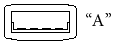 |
Generally the USB sockets are given on CPU with USB-Type-A |
 |
And the USB socket on the peripherals such as Scanner/printers etc are of USB Type B |
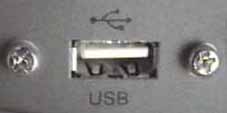
The pinout description and the closeup shot of USB port on CPU Cabinet is given below. Notice the USB logo at top of it.
|
USB Socket and Pinouts on
Motherboard | ||
| Pin No. | Name | Description |
| 1 | VCC | +5voltage (max. 500mAmp) |
| 2 | D- | Data - (Input to computer) |
| 3 | D+ | Data + (Output from computer) |
| 4 | GND | Ground for voltage |
The port on motherboard gives the 5volt Output (500mAmp) to power the low voltage peripherals which can be used with computer without extra power supply like USB modems or Floppy Drives. For my sony vaio laptop, I have an external Floppy Drive and CDROM drive which work only on USB ports and not the extra voltage power. That's cool. To know more on USB keep asking those cool silly questions so that I can put them in FAQ for everything else there are following links are enough.
GREAT LINKS ON USB
| 1. | http://www.usb.org |
| 2. | http://www.everythingusb.com/usb1.1/ |
| 1. | Any pinout of USB cable to connect two computers directly on USB? |
| 2. | What is the general speed of USB ? How do we compare it with other peripherals? |
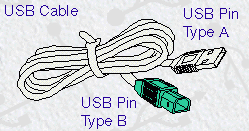
| 3. | How does the standard USB cable look like? |
FREQUENTLY GIVEN
ANSWERS
1.
Any pinout of
USB cable to connect two computers directly on USB?
Ans: NO! It isNOT
possible to connect two computers thru USB ports DIRECTLY. There
are some proprietary Cables available in market in less than 60$ which have a
built-in electronic circuit with a special software to be installed on both
machines. In fact, I am using one such cable to transfer files from my laptop to
desktop at high speed, at 12Mbytes to 16MBytes per second, that's great speed.
WARNING: Do not make USB cable on your own as USB ports
do have 5volt DC current as output which can damage both motherboards.
Back
to INDEX |
Go top
| The comparison of USB with other IO ports can be verified as follows. | |
| Serial Port | 115kbits/s (0.115Mbits/s) |
| Standard Parallel Port (SPP) | 115kBYTES/s (0.115MBYTES/s) |
| ECP/EPP parallel port: | 3MBYTES/s |
| USB | 12Mbits/s (1.5MBYTES/s) |
| USB 2.0 | 12MBytes/s |
| IDE | 3.3 to 16.7MBYTES/s |
| UltraIDE | 33MBYTES/s |
| SCSI-1 | 5MBYTES/s |
| SCSI-2 (Fast SCSI, Fast Narrow SCSI) | 10MBYTES/s |
| Fast Wide SCSI (Wide SCSI) | 20MBYTES/s |
| Ultra SCSI (SCSI-3, Fast-20, Ultra Narrow) | 20MBYTES/s |
| Wide Ultra SCSI (Fast Wide 20) | 40MBYTES/s |
| Ultra2 SCSI | 40MBYTES/s |
| IEEE-1394 (FireWire) | 100-400Mbits/s (12.5 to 50MBYTES/s) |
| Wide Ultra2 SCSI | 80MBYTES/s |
| Ultra3 SCSI | 80MBYTES/s |
| Wide Ultra3 SCSI | 160MBYTES/s |
| FC-AL Fiber Channel | 100-400MBYTES/s |